
- Download the highlight mode from gnome.org
- Start up terminal, change dirctory to your Downloads directory. Note the capital “D”, or you’ll get an error. Find your file with the “ls” command. My file is
cd Downloads
ls a*You should see your file. In my case I did see apache.lang
- Copy (cp command) the .lang file to the right directory for Gedit, /usr/share/gtksourceview-3.0/language-specs/ You will need “sudo” in order to get root access.
sudo cp apache.lang /usr/share/gtksourceview-3.0/language-specs/apache.lang
- Close and reopen Gedit. Now when you edit a .htaccess file the highlighting should show up.

Gedit adding highlight mode for .htaccess: rewrite commands.

Gedit adding highlight mode for .htaccess: user agent bans.
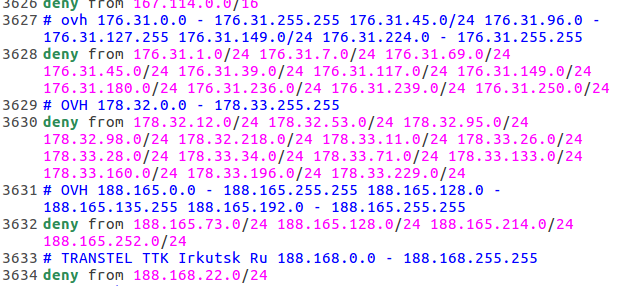
Gedit adding highlight mode for .htaccess: IP bans.
Addendum: 2017-feb-28 : Added Twig.lang to gedit
Starting to get into Twig for Drupal 8 development, so found a Twig plugin for Gedit by gabrielcorpse. Had a hard time finding the proper directory for the lang files, as they are hidden. Tried to copy the twig.lang into the gtksourceview-3.0 dir, but it needs sudo, so did it in terminal
sudo cp twig.lang /usr/share/gtksourceview-3.0/language-specs/twig.lang
Tested it with this twig snippet:
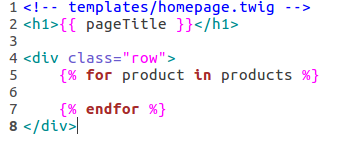
Gedit Twig example with Twig plugin. Photo by Don Tai
It seems to work!
Addendum: 2017-aug-13 : Added openSCAD’s lang file to gedit
As I have started doing 3D printing, I needed a design program such as openSCAD. Andrew James Turner had written the lang file for gedit, so I added it. From root:
$ git clone https://github.com/AndrewJamesTurner/openSCAD-lang-file.git
$ cd openSCAD-lang-file
$ sudo cp twig.lang /usr/share/gtksourceview-3.0/language-specs/scad.lang
Open gedit, edit a scad file and the scad syntax will highlight.