We are human, there is no denying this. As technology improves and allows us more convenience this also has disadvantages. Human physiology, which we cannot control, is a force that contributes to our behaviour. The less we need to concentrate on something, the more our mind wanders to other aspects of our lives. This propensity is not something we can control. It is autonomous and a built-in feature of our wonderful minds. That said, there are downsides, especially with safety.
It is no big news that for the majority of the 99% of regular people the last 10 years in North America has been economically tough. Our young have a difficult time finding stable employment. In fact finding stable work has been a challenge for quite a long time. Products from China undercut our domestic manufacturers who have largely gone out of business. Our kids will not have a better life than us. It is clear that larger forces than the Canadian environment are at play here.
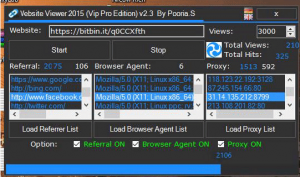
Ad fraud software in action. Target website, randomized referrers, browser agents and proxy IP addresses. That is enough to spoof anti-bot software.
It is no secret that I battle and ban bad bots on my site. If a bot is not a well known search engine or provides me some type of service then I usually ban it. Sure it can visit my site, but it will receive a blank page. But why do they visit? Who is paying them? Welcome to the world of Online Ad Fraud.
Western Digital WD1200 IDE 3.5 inch 120G disk drive, for a desktop, circa 2002, Made in Malaysia. The outer aluminum shell and cover. Besides the 6 perimeter screws remember the two screws hidden under the label. Photo 2 by Don Tai.
This IDE Western Digital WD1200 hard disk drive, we have had, for a very long time. I do not even think it was mine, passed down by a well intended soul with a “Could you get it to work?”. Well, no. It dates back to 2002 and at 120G, made in Malaysia, was large at the time. Alas there was a clicking noise from the disk and it stopped working. All data was lost. I thought that Little Weed and I would do a father and son device autopsy, just for fun.
I have been trying to install the Manjaro Architect 17.0.2 OS, but have been getting only minor successes. This iso is not for the beginner. I have an old 14 year old circa 2003 P3 800 desktop, 500mb ram, which can currently run Puppy Tahr Linux as well as Debian 8 Jessie with the Enlightenment E17 desktop. I had originally wanted to load the Enlightenment E17 desktop, which I could not find. I was able to load E20, but it was far too slow to run. I deleted E20. Then I tried the minimal LXQt, which did not start. Now I’m having to reinstall Manjaro from scratch and will try to install LXQt from their disk.
It should have been easy. After all, I had successfully installed its base components on another partition, but no, it did not go well. I have an old P3 800, 500mb ram desktop of circa 2003 vintage, so 14 years old. Bohdi Linux is supposed to be a lightweight distro for old computers. It did not install very well on my old biddy.
Bohdi Linux 4.2.0 Legacy is 32 bit and runs on a base of Debian Linux 8 or 9, with an Enlightenment E17 desktop environment. On top of this Bohdi Linux packages things up, adds its own flavouring and spices, and is supposed to be a low spec distro. Here are its install requirements:
Toronto Public Library has 3d printing for a very reasonable price. So innovative!
Yesterday I attended a course at the Toronto Public Library (TPL) called Introduction to 3D Design. The topic is broad, so we did not cover much in the 1.5 hour class. Still, it was a good introduction, enough to get me going on research on the topic.
The TPL has created Digital Innovation Hubs within their libraries, one of which is near my house. These are special rooms within the library that house specialized computers, 3d printers, Arduino units and much more. I was especially interested in the 3D Design & Printing. There are 2 classes to take, one of which I did yesterday, and another which I am booked in late August.
This time instead of trying SCIM or Ibus I just went for FCITX. After the initial install of Debian 8 Jessie’s fcitx-sunpinyin package, I had to do only a couple of command line statements, and it configured properly. This gave me a crude but working simplified Chinese input and display. Though it looks out of place with the slickness of Enlightenment E17, I am fine with it.
My search continues for possible Linux operating systems for an old desktop. I have successfully installed Puppy Linux Tahrpup 6.0.5 and it runs very well. I wondered if a fresh Debian 8 Jessie server install coupled with a lightweight desktop such as Enlightenment E17 would work. I was pleasantly surprised. It does.
My old desktop is circa 2003, so about 14 years old. I say circa because it originally came with Windows ME, of year 2000 vintage. The desktop is a Pentium 3 800 mhz, 500mb ram and some disk, partitioned for multiple Linux test distributions. It can boot up from a CD but not a USB. I want these Linux installs to be as small as possible, preferably below the 2G disk mark. I allocated 4G for the root partition.
Puppy Linux Tahr 5.0.6 fits into 1G of disk space and runs well on only 500mb of RAM on an old XP box.
Previously I installed Puppy Linux Slako 5.7.1 with SCIM Chinese. Since I regularly use Ubuntu I thought it best to install Puppy Linux Tahr 5.0.6, commonly called “tahrpup” instead. I tried to install SCIM Chinese teh same way as on the Slacko version, and it failed. Eventually I did get the FCITX Chinese to install. It works very well, but was somewhat difficult to find out what works.